
The software
Revit
Autodesk BIM software used by architects and engineers to design, document and coordinate construction projects.
14-day free trial, no card required
Revit tools that automate everything. Fewer clicks, better results.
Compatible with Revit
Creating views one by one, placing sheets, renaming and copying data by hand. Hours every week that aren't design. The problem isn't Revit. It's the repetitive work.
If you already know what Revit plugins are, skip this section.
The software
Autodesk BIM software used by architects and engineers to design, document and coordinate construction projects.
The extension
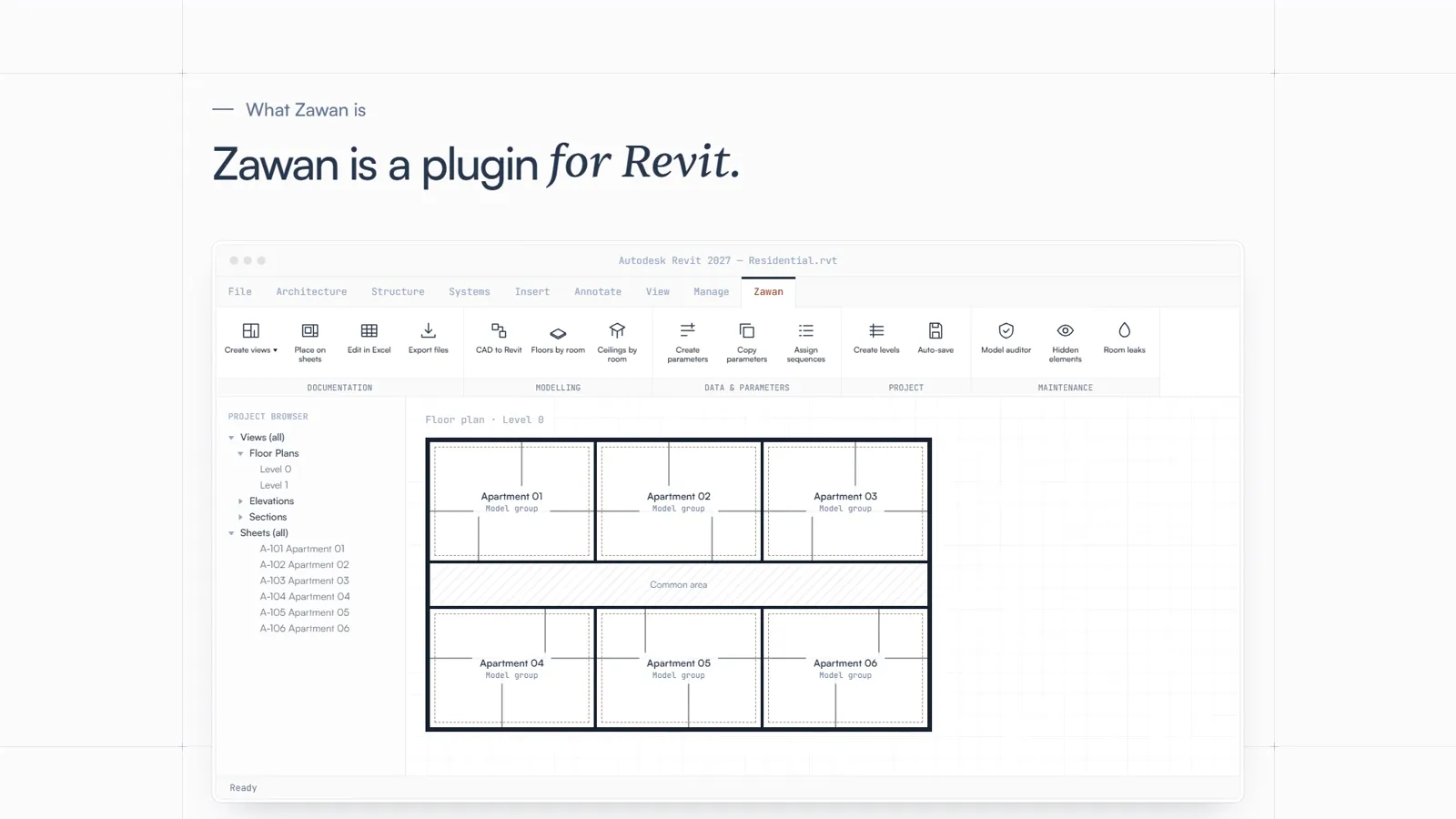
A program you install on top of Revit that adds a new tab with its own commands, directly inside the software interface.
This product
Automates the repetitive work in your Revit projects: documentation, modelling, data and parameters, project setup and model maintenance. Without touching one element at a time. No coding required.
Documentation
Modelling · Coming soon
Data & parameters · Coming soon
Project · Coming soon
Maintenance · Coming soon
↑ Your new tab, always available inside Revit. Click a command to see what it does.
There are many Revit plugins, but they often ask you for scripts, setup or learning how they think. Zawan does the opposite: open it, use it and finish sooner.
Time saver
What you used to do element by element, ZAWAN applies to dozens at once.
ELEMENTS IN ONE OPERATION
Completed0
Estimate: 1.5 min per element by hand versus a few seconds with Zawan.
Consistent names
Rename views and sheets following a pattern. Goodbye to “Copy of Level 1 (2)”.
Other Revit plugins
Zawan
First use
Other Revit pluginsInstall, configure and sometimes write your own scripts.
ZawanInstall it like any Windows program and its tab appears in Revit. No coding.
Every task
Other Revit pluginsA separate tool for each thing you want to do.
ZawanPackages that cover the whole Revit workflow, from documentation to model maintenance.
Every operation
Other Revit pluginsElement by element, or with a custom script.
ZawanOne single operation on dozens of elements at once.
If you get stuck
Other Revit pluginsDocumentation and forums.
ZawanWrite to us and we answer you personally.
Try it on your next project. 14 days with every package, no card and no automatic charge. If it does not save you hours, you pay nothing.
Pricing
Packages are paid once and licenses are per computer. You decide how many.
1 · Packages
Each package is a one-time payment and works on all your licenses: adding a package doesn't make your licenses more expensive.
Documentation
Views, sheets, schedules and batch export, with data editing in Excel.
Launch price
€390.00 Regular price: €490.00 · one-off + tax
Modelling
From CAD to Revit and room finishes: ceilings, floors and wall finishes.
Data & parameters
Create and manage parameters, copy values between elements and rename families and groups.
Project
Set up the project, manage CAD files and transfer content between files.
Maintenance
Inspection, purging and duplicate cleanup to keep the model light and tidy.
2 · Licenses
3licenses
Price per license by how many you have
Each license
€1,170.00
14 days · No card · No automatic charge
One license = one computer, with all your packages. 14-day free trial, no card and no automatic charge.
Need more than 20 licenses? Contact us: contacto@zawanstudio.com
This is an estimate: the final price is calculated by Paddle at checkout, based on your country.
No. The plugin installs and works like any other Windows program. No programming knowledge, Revit API experience or technical background required.
It comes as a Windows installer. Run it with Revit closed and the plugin will appear in its own tab inside Revit.
The plugin supports Revit 2023, 2024, 2025, 2026 and 2027 on Windows.
No. Revit is Windows-only, so the plugin requires Windows as well.
ZAWAN is organised in five command packages: Documentation, Modeling, Data and parameters, Project and Maintenance. For now only Documentation can be purchased (commands for views, sheets, schedules and Excel editing); the others are coming soon. You can see every command of each package in the Packages section.
Yes. You get a 14-day free trial of the Documentation package on 1 computer, with no card and no automatic charge when it ends. Reinstalling the plugin or switching computers does not restart the trial. When it ends you will need to subscribe to keep using the tools; your account stays available to manage your purchase.
You create your ZAWAN account and choose the packages you need; each package is paid only once. You also pay a monthly or annual subscription for as many licenses as you want (at least one), with volume discounts. Each license is one computer: it is activated when you sign in from Revit, stays assigned to that computer and lets it use every package you have bought. Packages and licenses are always purchased from the website.
License and package prices are shown excluding VAT, and the total you pay (in the simulator and at checkout) includes it: your country's, calculated by Paddle, our authorised reseller, who handles the payment and sends you the invoice. If you buy as an EU business with a valid VAT ID (registered in VIES), enter it at checkout and no VAT is charged, under the reverse charge.
Yes. While your subscription is active you get every improvement to the packages you have bought and their compatibility with the supported Revit versions. New packages we release are bought separately.
You can buy with a single account and everyone can sign in with it, but every computer that uses ZAWAN needs its own license: five people using the plugin need five licenses, and all of them can use every package you have bought. Having several Revit versions open on the same computer does not use extra licenses.
Release the license from the plugin (on that same computer) or from My account on the website, with a code we email you; this also works if the old computer is off or broken. Each license can change computer once every 30 days. Closing Revit, signing out or going days offline does not release the license.
For studios and companies with many computers there is an Enterprise offer, on request: email us at contacto@zawanstudio.com and we will assign the licenses.
Yes. You can cancel the renewal at any time and keep access until the end of the period you already paid for.
The plugin checks the license when Revit opens and at most once a day. You can work up to 7 days offline; after that it needs to connect to continue. Automations run entirely on your local Revit model.
No. The plugin works fully locally and never uploads or accesses your models, drawings or project data.
Every hour you save is an hour on the project. Start getting them back today.